Why isn't there a "+ MCP" button inside the mobile app?
Both Claude (Anthropic) and ChatGPT (OpenAI) deliberately keep connector management in the web back end. The reason is security: an MCP server gains access to your AI chat and potentially to your data, so it has to be authorised cleanly once. That authorisation runs through an OAuth 2.1 flow that needs a browser. The mobile app has no field to paste an MCP URL.
What you can do on the phone: open the browser, sign into claude.ai or chatgpt.com, configure the connector there, then use it in the app. Sync takes a few seconds, an app restart is usually not required.
For agentView you need exactly two pieces of information, identical for both apps:
Name: agentView
URL: https://agentview.de/mcp
The rest is handled by the OAuth login, where you authorise the connector with your agentView account. No account yet? Create one in 30 seconds, no credit card.
Step by step: connect agentView as a Claude connector
Open the connectors page directly
Tap claude.ai/customize/connectors in Safari or Chrome on your phone and sign in. The deep link skips the profile menu and lands on the connectors page. A free Claude account is enough for one custom MCP connector.
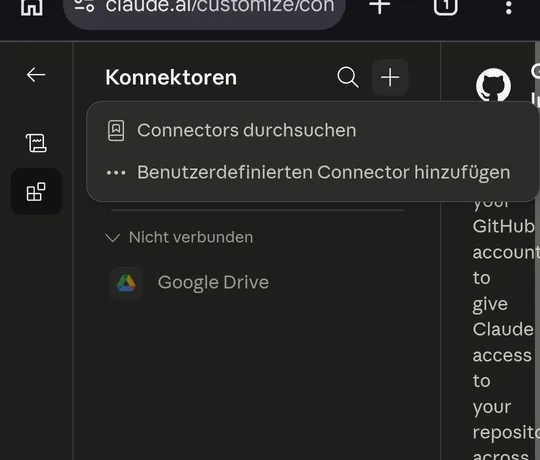
Tap "Add custom connector"
Tap the plus icon next to "Connectors" in the top bar. A small menu opens with two items: "Browse connectors" and "Add custom connector". Pick the second one.
Enter name and URL
Fill agentView as the name and
https://agentview.de/mcpas the URL. Leave "Advanced settings" collapsed: Claude detects OAuth on the first tool call. Tap "Add" at the bottom.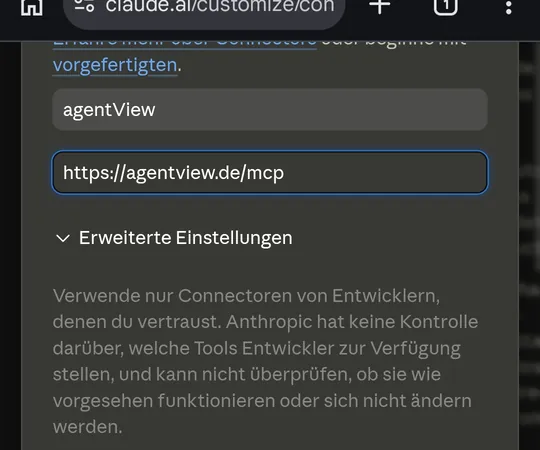
Confirm OAuth
On the first tool call Claude opens an OAuth page on agentview.de. Sign in with your agentView account, approve access, and the connector is active.
Use the connector in the mobile app
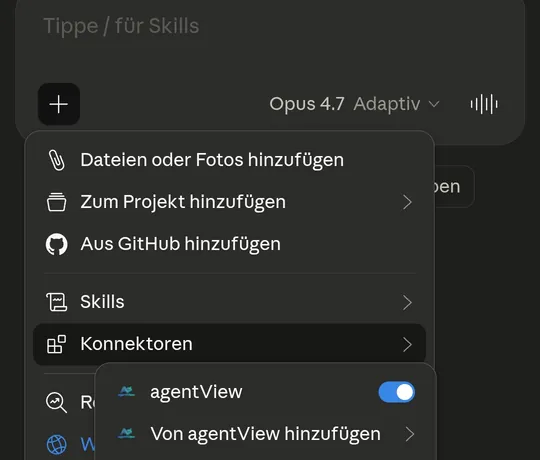
In the Claude app on iOS or Android tap the plus icon below the chat, then Connectors. agentView shows up with the toggle enabled. A prompt like "Show 'Almond croissants 2.40 EUR' on the counter display" is enough.
Step by step: connect agentView in ChatGPT
Open agentView in the ChatGPT directory
Tap agentView in ChatGPT and sign in to ChatGPT if asked. The page shows agentView in ChatGPT's app directory. Tap "Connect".
Sign in to agentView and approve
ChatGPT opens the sign-in page on agentview.de. Sign in with Google, Microsoft or a sign-in link and approve access. You land back in ChatGPT with the app connected.
Tell it the code from the screen
Open
display.agentview.deon the device that should show something. In the chat, write for example: "Connect screen 74M2N3 and show today's special: almond croissant, 2.40 euros". In the ChatGPT app on your phone, agentView sits behind the plus icon under "More".If agentView is missing from the directory
Some accounts have no app directory. Then add the app yourself: chatgpt.com/#settings/Connectors, "Apps" tab, "Create app" under "Advanced settings". Name agentView, URL
https://agentview.de/mcp, authentication OAuth, tick the risk checkbox, "Add". That is developer mode; the app then carries a DEV badge.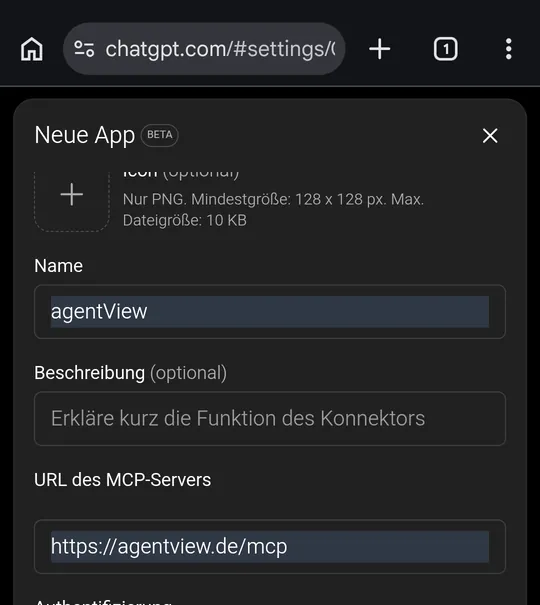
What works directly in a mobile browser?
Both vendors fully support connector setup in a mobile browser. Safari on iPhone, Chrome on Android, Firefox, Edge, all work. The web login flow is responsive, the OAuth consent screen adapts, the buttons are tap-friendly.
One caveat: stay in the same browser tab during the entire OAuth flow. If iOS switches you to a vendor app mid-flow (agentView does not have a mobile app, so this never happens with us), the flow breaks. With agentView the OAuth consent runs entirely on the web.
After saving and the first tool authorisation, open the Claude or ChatGPT mobile app and the connector is there. Switch to the tools menu (Claude) or the "+/Apps" menu (ChatGPT) and pick agentView.
What does agentView see of my chat account?
agentView only sees what you explicitly grant on the OAuth consent screen: your agentView username and the right to read displays and send content on your behalf. The chat content itself (what you write to Claude or ChatGPT) stays with the vendor; agentView never sees it.
Conversely, Claude or ChatGPT only sees the tool calls the connector declares (for example get_display, send_html). No access to your agentView password, no access to other accounts, no automatic login.
You can revoke the connector at any time: in the same connector list inside claude.ai or chatgpt.com, or directly in the agentView dashboard under Settings > API keys.
Frequently asked questions
How do I add an MCP server in Claude mobile?
Claude does not let you add an MCP server inside the iOS or Android app. You configure the connector on claude.ai in a browser; it then syncs to the mobile app. Direct link: claude.ai/customize/connectors. Tap the plus icon at the top right, pick "Add custom connector", enter name "agentView" and URL https://agentview.de/mcp, tap "Add", complete the OAuth flow on the first tool call. The connector is immediately available in the Claude app on iPhone and Android.
How do I add an MCP server in ChatGPT mobile?
Easiest through the app directory: open the "agentView in ChatGPT" link on this page, tap "Connect" and sign in with your agentView account. In the ChatGPT mobile app you then find agentView behind the plus icon under "More". If your account has no directory, add the app in developer mode: chatgpt.com/#settings/Connectors, "Apps" tab, "Advanced settings", "Create app", name "agentView", URL https://agentview.de/mcp, authentication "OAuth".
Do I need a computer, or is a smartphone enough?
A smartphone is enough. Connector setup happens in the browser, not in the app. Safari on iPhone or Chrome on Android are both fully responsive. VS Code or Cursor are only needed if you want to use the agentView MCP server inside a developer environment too, e.g. while building your own bot.
Does this work with free Claude?
Yes. The free Claude tier allows one custom MCP connector. Multiple connectors need a Pro, Max, Team, or Enterprise plan. If agentView is your only connector, free is enough.
Does this work with free ChatGPT?
Often, yes. Whether the app directory is available in your account is up to OpenAI, by region and plan; just try the link. Where it is missing, developer mode ("Create app") remains, which OpenAI documents for Plus, Pro, Team, Enterprise and Edu. Claude Free works for one connector either way. The agentView MCP server is identical in both apps.
What does agentView see of my Claude or ChatGPT account?
agentView only sees what you grant on the OAuth consent screen: your agentView username and the right to read displays and send content. The chat content (what you write to Claude or ChatGPT) is not visible to agentView; it stays with the vendor. Conversely, Claude or ChatGPT only sees the declared tool calls from agentView. No password, no broader account access.
How do I revoke access?
Two paths: in claude.ai or chatgpt.com under Settings, Connectors, agentView -> Remove. Or directly in the agentView dashboard under Settings, API keys, delete the OAuth token. Both take effect immediately and the connector disappears from the mobile app.
What happens when I switch my agentView login method?
agentView has no classic password. Sign-in is Magic Link, Google, or Microsoft. The OAuth token that Claude or ChatGPT holds for agentView is independent of the sign-in method; switching providers leaves the token in place. To end access explicitly, revoke the connector in the agentView dashboard or directly in claude.ai or chatgpt.com.
I added the connector but Claude or ChatGPT doesn't see it. What now?
Three checks. First, is the URL exactly https://agentview.de/mcp (https, no trailing slash, no typo)? Second, did the OAuth consent flow complete all the way back to claude.ai/chatgpt.com? Third, for ChatGPT: is Developer mode on? If all checks pass, log out and back in inside the mobile app to force a sync.
What can I ask the AI once the connector is live?
Anything the agentView MCP tool catalogue exposes: list displays, send content (HTML, URL, templates), set daily specials, update status boards. Example prompts: "List my displays." "Send the current weather to the reception screen." "Show 'Almond croissants 2.40 EUR' on the counter display." Which tools are available exactly is listed on the OAuth consent screen when you set up the connector.